Half the team sits around the table, the other half are tiles on the wall screen. Someone in the room makes a joke, the room laughs, and the laptop mic catches only the laugh. On screen, a colleague unmutes, waits for a gap, and mutes again. A hybrid opener breaks down the same way unless someone plans the turns. This guide gives you two roles, a posted speaking order and a short round that puts the screen first. It works with one word typed in the chat, and the free online table can carry the cards.
What goes wrong for the people on screen
The gap between room and screen shows up in the numbers. Microsoft’s Work Trend Index 2022 surveyed 31,102 workers in 31 markets. In it, 43% of remote employees and 44% of hybrid employees said they don’t feel included in meetings. Only 27% of organizations had set new meeting etiquette for hybrid work (Microsoft 2022).
A study of a large Norwegian software organization looked at why. Stray, Moe and Semsøy observed hybrid meetings and interviewed employees. Remote participants engaged less than those in the office, especially when there was no clear speaking order. People on screen found it hard to enter a conversation, missed remarks and non-verbal cues, and were left out of the talk before and after the meeting (Stray et al. 2025). That last point matters for an opener. The few minutes before the agenda are when the room chats, and the screen hears a murmur.
Why the usual advice doesn’t land
The common fix is to give remote people a chance to speak. It fails when nobody owns it. The lead is running the agenda, the room is talking, and the chance to speak arrives as a pause the screen can’t see coming. When it comes, someone in the room can fill it first. The steps below turn “a chance” into a job, a list and a time box.
Step 1: Give two people a job
Pick two roles before the meeting and name them in the invite.
- Screen host. Someone on screen runs the round. They read the speaking order, call each name and watch the time.
- Room voice. Someone in the room watches the chat and the tiles. They read out any typed answer or pass, and they ask the room to repeat a line the mic missed.
Putting the host on screen changes who waits for whom. The room now waits for a voice from the speaker, the way the screen waits for the room. Rotate both roles each week, so the same two people don’t carry the round every time.
Step 2: Post the speaking order
Type the order in the chat before the first turn, and alternate screen and room: screen, room, screen, room, until everyone is on the list. Start with the screen. The room has had a few minutes of small talk already, and the screen hasn’t.
A posted list does two things. Everyone knows when their turn is coming, so nobody has to fight for a gap. And people on screen can see the list even when the room’s video shows only the backs of heads.
Step 3: Put one word where everyone can see it
A word on a whiteboard in the room is invisible on screen. Put the prompt in the chat or screen-share it, so the room and the screen read the same thing. The screen host can share the online table and draw cards for everyone. People in the room can follow on the wall screen or on their own laptops.
The Thesis cards each have an idea on one side and an everyday thing on the other. The thing side helps in a hybrid room: everyone has a mug, a sweater or a view from a window, wherever they’re sitting.
Independence has Mug on its back. For a hybrid team, Independence can be read as working from home without anyone to ask, or as a project someone carried alone. The Mug side is the easy way in. People at home and people in the office both have one in reach, and it can start a story about a first job or a favorite café.
Step 4: Make the pass typeable
The Thesis rules start with this line: “Before you start, agree together how passing works.” In a hybrid meeting, a spoken pass can cost more on screen than in the room. Unmuting to say “pass” can draw attention to the person passing. Agree that anyone can type “pass” in the chat, and the room voice reads it out. Then the turn moves on with no comment.
The same goes for answers. Someone with a bad connection or a noisy home can type their answer, and the room voice reads it aloud. The rule card puts the length in one line: “A short answer is a full answer. You can always ask for more.”
Silence has Tree on its back. It suits a hybrid team because silence is part of the setup: the muted tiles, the pause before the screen speaks, the quiet office on a Friday. Someone might talk about a quiet place they work best. Someone else might pick the tree and describe the one outside their window.
Step 5: Time box the round
Pick a time box that leaves room for every name on the list, and say it when you start. If a turn runs long, the screen host can say “one more sentence” and move on. One follow-up question per turn keeps the round inside the box. The rule card gives three examples: What did that feel like? Who else was there? Has it always meant that to you?
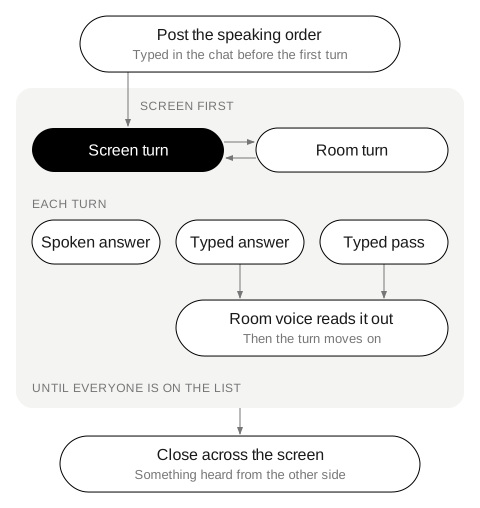
Step 6: Close across the screen
The Thesis rules end each game with one last round: “each player names one thing they discovered about someone at the table today.” In a hybrid meeting, add one condition. Each person names something they heard from someone on the other side of the screen. People in the room name something from a tile, people on screen name something from the room. A few answers are enough, then the agenda starts.
Fairness has Sweater on its back. It fits this round because fairness can come up in a hybrid team: who gets the good meeting room, who hears the decision first, whose time zone sets the meeting. A lighter way in is the sweater. The office that’s always too cold, or the sweater someone keeps at their desk, works for anyone.
Questions that work from the room and from home
The questions below don’t depend on where someone sits, and each one works at any depth:
- What’s an object within reach that has a story?
- What’s a sound you hear while you work?
- What does a good workday look like where you are right now?
- What’s something you learned from a colleague you’ve never met in person?
- What’s a small habit that makes your workday start well?
- What’s a spot away from your desk where you think well?
- What’s something you’d show the team if they could visit your workspace?
- What’s a tool you’d hate to lose?
Running it as a card round
With the deck on the table or the online table on the wall screen, each turn follows the same steps. Draw a card, choose the idea or the thing, roll the die and look at the word from that side. The die has six plain words: MEMORIES · BODY · PEOPLE · VALUES · CHILDHOOD · FUTURE. The only instruction is “Look at the word from that side.” The screen host can roll for everyone on the online table.
Before your next hybrid meeting, put two names and a speaking order in the invite: one screen host, one room voice, screen first. The cards above have their own pages: Independence, Silence and Fairness. To end the same meeting with one word, see check-out questions for meetings. For more on running it at work, see Thesis for teams and classes. For the studies behind the deck, see the research page. See the rules and the box.