You’ve found a handful of people who share the same experience, and none of them live near each other. A video call can hold that group. To start a support group online, decide who it’s for, meet on a platform your members already use, bring a second host, write a group agreement for the call, and keep each conversation small. This guide takes those steps in order, for peer hosts who run a group without a clinical role.
The steps come from two guides: the University of Kansas Community Tool Box, and a 2020 guide by Alison Faulkner for Mind, NSUN and three other UK groups, drawn from peer groups that moved onto video during lockdown (Faulkner 2020).
Step 1: Decide who it’s for and how it runs
The Community Tool Box starts with purpose: mutual support, education, sharing resources, building skills or social connection. Then come the format choices. An open group lets new members join at any time. A closed group takes members during a set enrollment period, which can help continuity and trust when the topic is sensitive. A group can run for a set number of sessions or keep going (Community Tool Box).
The same guide gives rough numbers. It says groups of about 5 to 15 people often work well, and many meet for about one to two hours, weekly, every other week or monthly. Shorter meetings can suit members’ schedules, health or energy better. Faulkner notes that following several faces on a small screen can be tiring. Write your choices into one paragraph. That paragraph becomes your invitation.
Step 2: Meet where your members already are
Faulkner found Zoom was the most common platform, and many groups kept phone calls going for members without the technology. One idea in the guide: start members in a WhatsApp group, since a chat can be easier to adapt to, and move them onto video calls as they grow confident. Online groups also reached people a local room didn’t: Deaf and Disabled people, people in isolated areas, and members in other countries.
Ask your members before you choose. Pair anyone unsure with a buddy from the group who can walk them through joining. Keep one person reachable by phone during the call for anyone who can’t get in.
Step 3: Bring a second host
It’s hard for one person to welcome people, watch for raised hands, read the chat and fix sound problems at once. Faulkner reports that most groups on Zoom had more than one facilitator, sometimes as many as three. A co-host can read the chat, call someone who dropped out, or run a breakout room. It’s also a first role for a member who hasn’t hosted before.
The Community Tool Box adds one line for every host: don’t present yourself as a clinician unless you are one. Have referral information ready for members who need more than the group offers.
Step 4: Write a group agreement for the call
An agreement written for a room misses things a call brings up. A member at home may share the space with family. A screenshot takes a second. Faulkner suggests reviewing the agreement with the group, so members share ownership of it. The Tool Box adds that nobody is ever required to share personal information.
These questions help a group write its online agreement in one session:
- Does everyone join from a room where nobody can overhear?
- Are headphones expected when others are home?
- Are cameras on, off, or each person’s choice?
- Can people join by phone, without video?
- Who reads the chat, and is it part of the conversation?
- Are private messages between members allowed?
- How does someone signal they want to speak?
- How does someone pass on a turn?
- What does a person do if they need to step away?
- Who follows up when someone leaves suddenly?
- Is recording or taking screenshots allowed?
On the last question, the host can block recording inside Zoom, but not a phone pointed at the screen. That part rests on the group’s agreement. For the call itself, Faulkner lists a waiting room, a password, and a link shared only with members. For stepping away, she suggests a thumbs up or a line in the chat, and a follow-up with anyone who leaves without one.
Step 5: Keep each conversation small
In data from several settings, Dunbar, Duncan and Nettle found an upper limit of about four people who can take part in one spontaneous conversation (Dunbar et al. 1995). Faulkner adds that on a call it’s harder to tell when someone wants to speak, especially when some members phone in or keep cameras off.
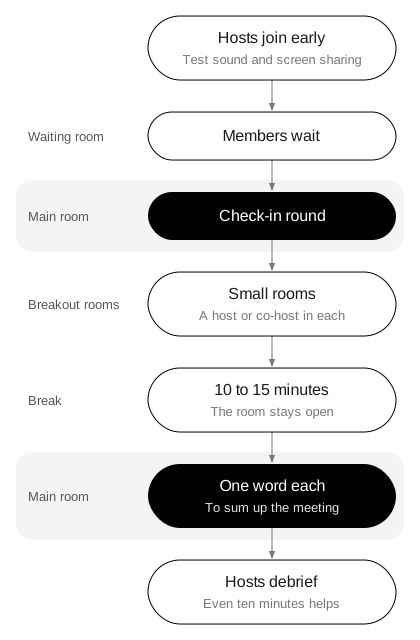
After one online Death Cafe, a guest asked for more space between comments, because the talk was lively and hard to join (Death Cafe write-up). If your group is larger than one conversation can hold, plan breakout rooms, each with a host or co-host. Keep the opening and closing rounds in the main room, so the whole group meets twice.
Faulkner writes that a call may need more structure: more turn-taking, and more care that everyone gets a turn. Going round in a fixed order is the plainest version. Post the order in the chat.
Step 6: Plan the first session in order
Hosts join early to check in with each other and test sound and screen sharing. Faulkner suggests opening with a check-in round.
GetUpSetUp, one of the guide’s partners, uses “Bring and Share”: each person brings an object or a short story that means something to them. An object on camera can give a nervous member something to point at besides themselves. Thesis cards work the same way, with an idea on one side and an everyday thing on the other.
Home is card 49, with Spoon on its other side. On a call, everyone is sitting in their own home, so the word is close at hand. A member can talk about what home meant growing up, or hold a spoon from their kitchen drawer up to the camera and say whose it was.
Plan a break of 10 to 15 minutes away from the screen in a longer session. GetUpSetUp leaves the room open during the break, so people can chat over a drink.
Step 7: Close the call gently
Faulkner calls endings online challenging: there’s no chat on the way out, and one click leaves a person alone at home. Faulkner suggests a closing round where each person shares one word to sum up the meeting. The Tool Box adds: close on time, and remind people when the next meeting is.
Community is card 42, and its object is Mirror. A closing round on this word lets members say what the group has become for them, in one sentence. The Mirror side fits a call too: a video call shows each of us our own face.
After the last member leaves, debrief with your co-host. Faulkner writes that even ten minutes helps to hold the group safely. Note who didn’t speak, and decide who calls them before next time. For closing rounds in more detail, see check-out questions for group therapy and support groups.
Try a round before the first meeting
A practice call with your co-host tests the platform, the turn order and the pause after each answer. Share your screen, draw a word each, and take one turn.
Play is card 50, with Laptop on the back. For two hosts testing a call, the Laptop side is already in front of you.
The die has six faces: MEMORIES · BODY · PEOPLE · VALUES · CHILDHOOD · FUTURE. The only instruction is “Look at the word from that side.” The rule card adds: “A short answer is a full answer. You can always ask for more.” For follow-ups, use the three on the rule card: What did that feel like? Who else was there? Has it always meant that to you?
You decide how far a card format goes in your group. Thesis is a conversation format and makes no clinical claims.
Write your purpose paragraph and the 11 agreement questions into one document today. Send it to one possible co-host and ask them to read it before your practice call.
The cards above have their own pages: Home, Community and Play. You can play online for free, roll the die on screen with a printed deck, see the rules and the box, or read the research behind the deck. For running the game in a group, see Thesis for therapy groups. For activities once the group is running, see loneliness group activities. Related: cancer support group discussion topics about everyday life.