An async check-in is one prompt posted in the team chat at a fixed time, with answers in a thread whenever each person gets to it. Nobody has to be online at the same moment, and nobody gets pinged. This guide is for leads of teams spread across time zones who want the warm-up of a meeting check-in without the meeting. It covers the setup in six steps, the thread rules, ten prompts that work in writing, and three words you can post as they are.
Why a call-based check-in breaks across time zones
A live check-in assumes everyone is in the same hour of the day. On a distributed team, the morning round lands at someone’s dinner and someone else’s early morning. In Buffer’s 2023 survey of 3,000 remote workers, 62 percent said people in their immediate team were spread across more than one time zone (Buffer 2023). The same survey found an almost even split between async-first and sync-first work.
Leads on these teams describe a second problem. Coming up with a new icebreaker every day turns into a chore, so the round can fade out. A written check-in with one short prompt fixes both: it waits for each person’s morning, and the lead only has to pick one word.
What remote work does to team contact
Remote work shifts how people talk, and that shift is the reason a check-in is worth the effort. In data on about 61,000 US Microsoft employees in the first half of 2020, firm-wide remote work made collaboration networks more static and siloed, with fewer links between groups. Synchronous communication went down and asynchronous communication went up (Yang et al. 2022). The authors suggest this may make it harder to pick up and share new information.
Contact outside the task also thins out. In the Buffer survey, 23 percent of remote workers selected loneliness as one of their struggles (Buffer 2023). A daily thread gives colleagues a place to hear something about each other outside the sprint board.
The cost of a ping
The point of going async is to leave focus time alone. In a lab study, 48 participants answered work emails while a “supervisor” interrupted them every two minutes by phone or instant message. They finished interrupted tasks faster with no drop in quality, and they reported more stress, frustration, time pressure and effort (Mark et al. 2008). It was a lab task, mostly with students, so it shows the price of constant interruptions, not of one message a day. Still, a check-in that pings the whole channel is one more interruption. The setup below keeps it quiet.
How to set up an async check-in in six steps
The steps run in the order you do them, from the first post to the weekly wrap-up.
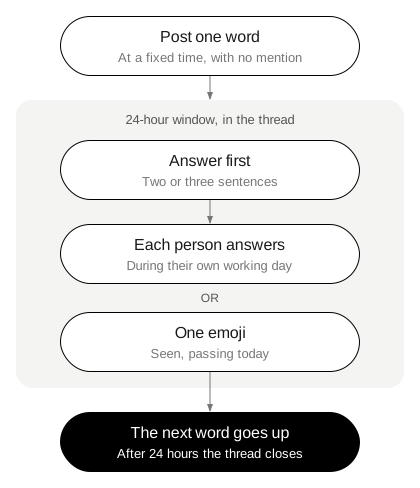
- Pick a channel and a time. Use an existing team channel. Post at the start of your own day and keep the time fixed, so people know where to look.
- Post one word or one prompt. One line, no preamble. A word lets each person choose the angle and the depth.
- Answer first, in the thread. Your reply shows the length you mean. Two or three sentences is a good default.
- Set a 24-hour window. Each person answers during their own working day. After 24 hours the thread closes and the next word goes up.
- Keep the pass to one emoji. Agree that a single reaction means “seen, passing today.” It needs no reason and nobody follows up on it.
- Close the week with one line. On Friday, post one thing you learned from the week’s threads. Name a theme, not a person’s private answer.
Thread rules that keep focus time intact
Write the rules once, pin them in the channel, and they’ll run without you. The five below cover what can go wrong in a written round.
- No channel-wide mentions. The post goes up without @here or @channel. People find it when they open the chat.
- Answers go in the thread. Replies in the main channel push work messages out of view.
- Notifications stay off. Suggest that people leave thread notifications off for the check-in, or mute it.
- Replies are optional. A reaction to someone’s answer is enough. A question back is welcome, and one is plenty.
- Work talk moves out. If an answer turns into a project question, take it to a direct message or the work channel.
The Thesis rule card has a line that fits the thread as it is: “A short answer is a full answer. You can always ask for more.”
Some people would rather not do digital small talk at all, and say so in forums. That’s a fair choice. The pass emoji gives them a way to stay in the thread without writing, and the 24-hour window means there’s no live moment where silence stands out. Treat a run of passes as information about the prompt, not about the person.
Ten async check-in questions
A written prompt works best when it can be answered in two sentences and makes sense at any hour. These ten fit a thread:
- What’s one thing you want to finish today?
- What’s taking up most of your attention this week?
- What does your workspace look like right now?
- What’s one thing that went better than expected yesterday?
- What time of day do you do your best work?
- What’s one thing you’re waiting on from someone else?
- What did you learn this week that you didn’t know on Monday?
- What’s a small thing that made your day easier?
- Where are you working from today, and what’s outside the window?
- What’s one thing you’d like the team to know about your week?
Keep one question for a few weeks before you change it. When the prompt repeats, the answers become easier to compare, and changes stand out.
Three words to post in the thread
A single word is the shortest prompt you can post. Each Thesis card has an idea on one side and an everyday thing on the other, and either side works as the day’s word. These three suit a remote team.
Boundaries has Shoes on its back. In a remote team, Boundaries brings out when people stop working, which hours they protect, and how they close the laptop. Shoes is the lighter side: the shoes by someone’s door, or the walk they take before work.
Work pairs with Stone. Work as a check-in word invites people to say what their job looks like from the inside this week. Stone gives a different reading: something heavy someone is carrying, a task that won’t move, or a stone they picked up on a walk.
Freedom has Compass on its back. Freedom suits a team that works flexible hours, because answers can name the part of remote work people value most. Compass is a good word for a team across time zones: where someone is, where they’re headed, or what they use to find their way.
The deck also has a die with six words: MEMORIES · BODY · PEOPLE · VALUES · CHILDHOOD · FUTURE. Look at the word from that side. In a thread, the lead can roll once and post the die word with the card word, so the whole team answers from one angle. For a follow-up question in the thread, the rule card gives three examples: What did that feel like? Who else was there? Has it always meant that to you?
To pick tomorrow’s word, open the online table and draw a card.
When the thread goes quiet
A thread can have quiet weeks. If replies drop to a few people for a week, change the prompt before you change the format. A word people can answer about objects, like Shoes or Compass, can be easier on a busy week than an idea. If the thread stays quiet after a new prompt, move to two days a week, or pause it and ask the team in one line whether they’d like it back.
On days the team meets live, a spoken round can replace the thread. For the live version, see how to run a check-in.
Tomorrow, before your first meeting, post one word in the team channel with no mention, answer it first in the thread, and pin the five rules underneath. The three words above have their own pages: Boundaries, Work and Freedom. For more on running it at work, see Thesis for teams and classes. For the studies behind the deck, see the research page. See the rules and the box. Related: check-out questions for meetings: end on one word.