You open the call, ask an icebreaker question, and look at a grid of dark tiles with initials on them. Nobody can tell who’s about to speak, so nobody does. A virtual icebreaker for Zoom or Teams works better when it doesn’t depend on faces. This guide sets up a round that runs on one shared screen, a turn order in the chat, and voice or text answers. Cameras stay optional. It works with a word typed into the chat, and the free online table adds a card and a die on screen.
Cameras off is a fair starting point
Asking people to turn cameras on for the icebreaker has a measured cost. Shockley and colleagues ran a four-week field experiment with 103 employees, switching their cameras on or off in virtual meetings. Across 1,408 daily reports, days with the camera on were linked to more fatigue, and fatigue was linked to people speaking up and engaging less in meetings. The authors also predicted the effect would be stronger for women and for newer employees (Shockley et al. 2021). So the round below assumes cameras are off and treats a camera on as a bonus.
Why remote teams still need the first minutes
On a remote team, the meeting can be the only place people hear each other outside of work tasks. In Gallup’s 2024 global workplace data, one in five employees said they’d felt lonely a lot of the previous day. The share was 25% for fully remote workers, 21% for hybrid workers and 16% for those fully on-site (Gallup 2024). A study of 61,182 Microsoft employees in the US found that firm-wide remote work made collaboration networks more static and siloed, with more communication moving to asynchronous channels (Yang et al. 2022). A short round won’t fix either. It does give people a regular moment to hear colleagues talk about something other than the ticket queue.
What a camera-off round needs
A round on a call loses the cues a room gives you: who’s leaning in, who’s about to talk, whose turn is next. The setup replaces each cue with something on the screen or in the chat:
- One shared prompt. Everyone looks at the same word on the same shared screen.
- A written turn order. Names in the chat, so nobody waits to see who goes next.
- Two ways to answer. Speak, or type a sentence in the chat.
- A free pass. Said out loud before the first turn, with no reason needed.
Setting it up on Zoom or Teams
The steps below are in the order you’d run them on the call.
- Put the word in the invite. Add one word to the calendar invite before the call, such as Balance or Rest. People who need time to think get it.
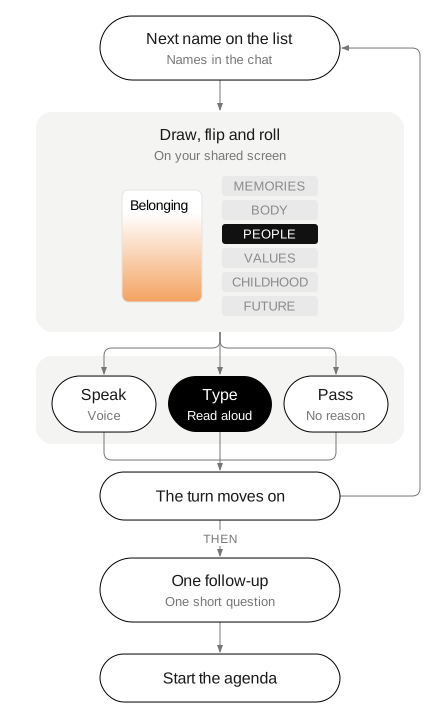
- Share one screen. Open the online table and share your screen. You draw, flip and roll for whoever’s turn it is, so nobody else has to open anything.
- Post the order in the chat. A video call has no left, so the rule “Pass the die to the left” becomes a list of names. Alphabetical order works.
- Say how passing works. The Thesis rules open with “Before you start, agree together how passing works.” At work, make it one sentence: anyone can pass, no reason needed, and the turn moves on.
- Go first yourself. Keep your answer to two or three sentences. The first answer can set the length for the round.
- Read typed answers aloud. When someone answers in the chat, read their sentence to the group, so it counts as a turn like any other.
- Allow one follow-up, then start the agenda. One person may ask one short question. Then close the round on time.
Three cards that suit a remote team
Each Thesis card has an idea on one side and an everyday thing on the other. On a call, the thing side helps: anyone can talk about an object near their desk without showing the room.
Belonging has Headphones on its back. For a remote team, Belonging can be read as the first week in a new job, a team chat that finally felt like a team, or a time zone that never quite matched. Headphones can sit on any desk on the call. Someone might talk about the pair they wear for every meeting, or the album they put on to focus.
Balance has Watch on its back. It reads as work hours at home, a calendar with no gaps, or a walk at lunch. The Watch side gives an easy route for anyone who’d rather not talk about their workload: a watch they were given, or the way they check the time across time zones.
Trust has Window on its back. Trust on a team that rarely meets can be about handing off work to someone you’ve never met in person. Window is the softer side. Anyone can say what’s outside their window right now, and the answer may be the first time the team learns which city a colleague works from.
Questions for a camera-off round
The questions below work in voice or in one line of chat. None of them asks people to show their room or share family details:
- What’s on your desk right now that has a story?
- What’s outside your window today?
- What’s a sound you work best with?
- What does a good break look like on a workday at home?
- What’s a tool you use every day that you’d hate to lose?
- What’s something you learned from a colleague you’ve never met in person?
- What’s a small thing that makes a call go well?
- What time is it where you are, and what does that time usually look like?
- What’s something you’re curious about this month?
Formats to leave out
Some virtual icebreakers need cameras or reach into people’s homes. A tour of your workspace, a pet on screen, or a show-and-tell from the room all depend on video and reveal home life. Remote workers also describe weekly virtual happy hours where everyone feels awkward and the talk drifts back to work. An open, unstructured social slot puts the cost on whoever speaks first. A single word and a written order keep the round short and give everyone the same task.
Running it as a card round
With the online table on your shared screen, each turn follows the same steps. Draw a card, choose the idea or the thing, roll the die and look at the word from that side. The die has six plain words: MEMORIES · BODY · PEOPLE · VALUES · CHILDHOOD · FUTURE. The only instruction is “Look at the word from that side.” The rule card adds: “A short answer is a full answer. You can always ask for more.” Follow-up questions stay short. The rule card gives three: What did that feel like? Who else was there? Has it always meant that to you?
Before your next call, add one word to the invite and paste the turn order into the chat at the start. The cards above have their own pages: Belonging, Balance and Trust. If some people on the team would rather skip openers entirely, see how to opt out of icebreakers. For more on running it at work, see Thesis for teams and classes. For the studies behind the deck, see the research. See the rules and the box. For the same round in a room, see quick icebreakers for meetings.